


































Guest post by Nicole Ronchetti, Independent Consultant at Junova
The difference between a generic AI answer and a genuinely useful one is context. When you are troubleshooting Acumatica, the real artifact usually matters more than the error message. XML, JSON, report definitions, customization code, stack traces, and sample data give the model something concrete to reason over instead of leaving it to make polite guesses.
One quick note on scope: this guide is about using general-purpose AI assistants — tools like Claude, ChatGPT, and similar — as a technical troubleshooting resource. It is not about Acumatica AI Studio or any in-product AI feature. Think of it as having a knowledgeable consultant available at any hour, as long as you give them the right information to work with.

TIP 01
The Golden Rule: include the artifact, not just the symptom

- What to attach: GI definitions, notification configs, import scenarios, customization packages, reports, schedules, and request or response bodies are all fair game.
- Why it matters: Field names, joins, conditions, and mappings live inside the artifact. That is where the real debugging clues are.
- Best practice: When possible, share the whole relevant export. The bug loves hiding in the part humans assumed was unimportant.

Tip 02
Generic Inquiries: troubleshoot, explain, or build faster

- Wrong data or duplicate rows: Describe what you expect versus what the GI returns, then ask the model to audit joins, WHERE clauses, grouping, and filters.
- New GI from a working pattern: Paste a similar GI and ask the model to adapt it to a new business need rather than inventing everything from scratch.
- Slow performance: Ask which joins, filter choices, or missing parameters are likely creating unnecessary load or poor execution paths.

TIP 03
Customization packages: inherited logic, code review, and upgrade risk

- Upgrade review: Ask what platform or event changes between versions could break the customization before you upgrade.
- Code quality check: Use AI to flag suspicious patterns such as direct SQL usage, shaky event handling, or misuse of PXDatabase versus PXSelect.
- Plain-English walkthroughs: If you inherited the code, ask what it does, when it fires, and which objects or tables it touches.

TIP 04
Import scenarios and data migration

- Mapping failures: Ask the model to compare the scenario logic with failing rows so it can spot type mismatches, key issues, or missing required fields.
- Scenario planning: Describe the source system and target screen, then ask AI to sketch the mapping approach before you build in the UI.
- Data cleanup: Messy spreadsheets are a human tradition. Ask for formulas, scripts, or transformation logic to reshape the source data before import.

TIP 05
Workflow, approvals, and push notifications

- Push notifications: Ask the model to verify field references and condition blocks when an alert fires too often or not at all.
- Schedules or business events: Share the trigger definition and ask where the event logic or timing assumptions break down.
- Approval paths: Paste the rule configuration and describe the failed scenario so AI can map which branch was matched, skipped, or misunderstood.

TIP 06
API and web service integrations

- Contract-based API errors: Ask the model to compare your payload against the endpoint schema and identify missing, misplaced, or malformed fields.
- Drafting new payloads: Describe the business action you want, then ask for a starter JSON body for the exact version and endpoint.
- OData help: State the data request in plain English and ask for the filter syntax, especially when you are fighting one of Acumatica’s charming little quirks.

TIP 07
Report Writer and analytical reports

- Wrong totals or grouping: Ask the model to trace how the report is grouping or aggregating data and where the logic drifts from the intended output.
- Calculated fields: Acumatica expression syntax is not exactly famous for elegance. AI can usually debug or rewrite it faster than manual trial and error.
- Subreports: Share both parent and child snippets so the link fields and data flow can be checked together.

TIP 08
Prompting moves that improve almost every answer

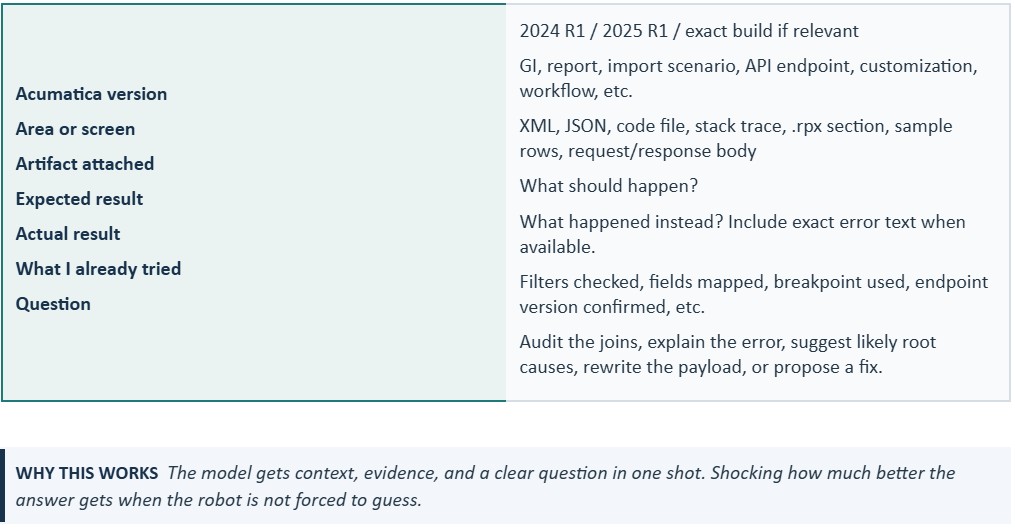
- State the version: Always include the Acumatica release or build when behavior, fields, or APIs may differ across versions.
- Describe expected versus actual: I expected X but got Y is dramatically better than it is broken, which tells the machine almost nothing.
- Include what you already tried: This prevents repetitive suggestions and pushes the answer toward less obvious root causes.
- Ask for secondary causes: After the first answer, ask what else could cause this so the model surfaces edge cases and adjacent issues.
- Use AI as a second opinion: If you already have a theory, test it. Ask whether your reasoning holds up and what you might be overlooking.

BONUS NOTES
A few extra moves worth stealing

- Ask for a walkthrough: When you inherit a GI or customization you did not build, a plain-English explanation is often the fastest route to understanding.
- Use the trace log: A real stack trace gives the model a graph, DAC, method, and line number trail instead of a generic user-facing message.
- Refine iteratively: Start with an audit, then ask the model to rewrite only the joins, only the payload, or only the mapping logic. Smaller asks produce cleaner revisions.
- Let AI draft before you build: For a new integration or workflow, ask for the initial structure first. It is far easier to edit a draft than to stare into the void of a blank screen.
QUICK REFERENCE
A prompt template that works in ChatGPT or Claude
About This Guide
These tips come from hands-on experience building, configuring, and troubleshooting within the Acumatica ecosystem. The methodology here is not about training custom AI models — it’s about learning how to give general-purpose AI the right context so it can reason effectively about your specific problem. The insight is in the prompting, not the platform.
Let’s Keep the Conversation Going
Have a tip that didn’t make this list? Found a creative way to use AI in your Acumatica work? I’d love to hear it. Connect with me on LinkedIn and let’s compare notes.