































For many manufacturers, one of the most consequential data handoffs happens between engineering and ERP.
A product may be fully defined in CAD, PDM, or PLM, but purchasing, planning, costing, and production depend on accurate item, bill of material (BOM), routing, revision, and document information in Acumatica. When that information moves through spreadsheets, exports, and repeated data entry, a gap can form between what engineering approved and what manufacturing is preparing to build.
The real Engineering-to-ERP challenge is not simply transferring data. It is releasing product information into Acumatica in a form that is complete, manufacturing-ready, and appropriately controlled.
A Common Engineering-Change Scenario
Consider a manufacturer preparing a revised assembly.
Engineering updates the CAD model, replaces a component, and releases a revised engineering BOM. Purchasing, however, still has the previous component in Acumatica. Production is working from an earlier routing, while a planner manually compares part numbers and quantities in a spreadsheet.
The information exists—but the systems and teams do not yet share the same approved version.
A reliable Engineering-to-Acumatica workflow helps prevent this disconnect. Before a revision reaches purchasing or production, the organization needs a defined process to identify what changed, add the information manufacturing requires, validate the proposed ERP records, and approve the release.
Why Engineering and Acumatica Need Different Data
Engineering systems and ERP systems serve different but complementary purposes.
CAD, PDM and PLM systems describe the product’s design. Acumatica supports the business and manufacturing processes required to purchase, plan, cost, produce, and service it.
Because of those different responsibilities, an engineering BOM is not always ready to become a production BOM without additional preparation. For example:
- A component’s engineering description may not follow the organization’s ERP naming convention.
- Units of measure may differ between engineering and purchasing.
- Raw materials, adhesives, paint, lubricants, packaging, and other non-geometric items may not appear in the CAD assembly or PDM/PLM BOM.
- Acumatica may require inventory classifications, warehouses, lead times, or other fields that engineering does not maintain.
- Routing and operation information may need to be added before production planning begins.
- Drawings and supporting documents must remain associated with the correct item and revision.
A successful integration should not force Engineering data and Acumatica to become identical. It should create a governed transition between them.
A Practical Four-Step Workflow
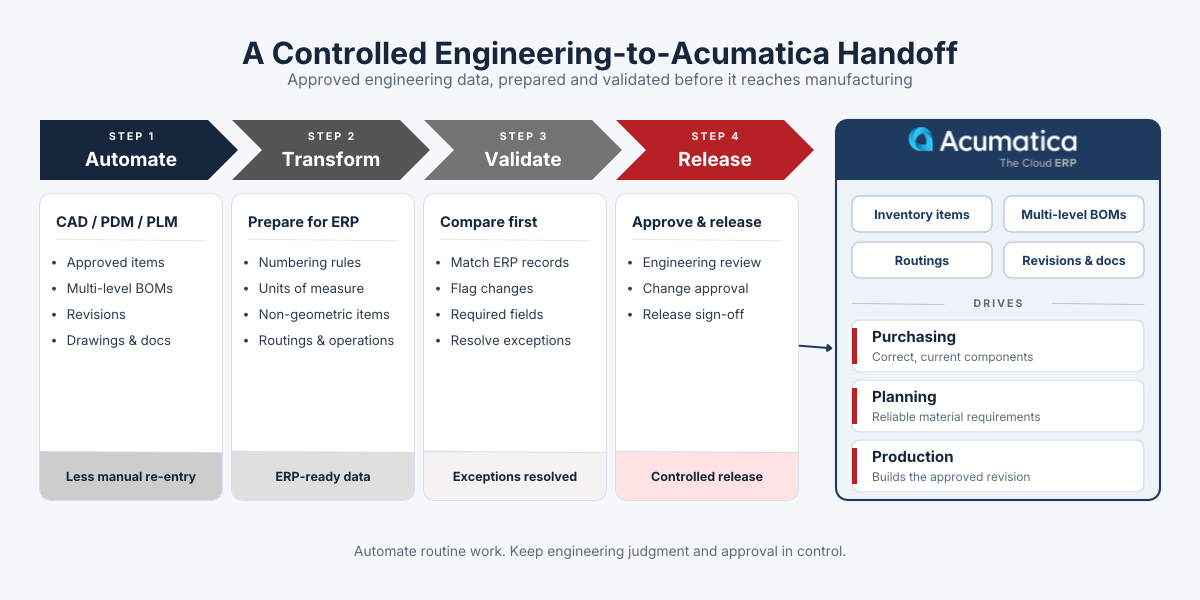
Manufacturers can evaluate their engineering-to-Acumatica handoff using four steps: automate, transform, validate, and release.
- Automate
Reduce repetitive entry for information that has already been approved in engineering.
For example, a workflow may create or update supported Acumatica inventory items and multi-level BOM structures using information from CAD, PDM, or PLM. The goal is not to automate every decision; it is to avoid reconstructing reliable data unnecessarily.
- Transform
Prepare engineering information for its downstream manufacturing purpose.
This may include applying item-numbering rules, standardizing descriptions, converting units of measure, adding non-geometric materials, or incorporating routing and operation information. Transformation turns an engineering structure into information Acumatica can use for planning and production.
- Validate
Compare proposed information with existing Acumatica records before applying changes.
Validation should identify relevant differences in part numbers, revisions, quantities, descriptions, units of measure, required fields, and other configured attributes. Users can then resolve exceptions instead of discovering them after purchasing or production has acted.
- Release
Apply an approval process appropriate to the organization’s risk and operating model.
Some manufacturers may allow routine, validated updates to proceed with minimal intervention. Others may require engineering review, change approval, or formal release authorization. Safety-critical products and regulated processes may require additional controls.
The objective is to automate routine work without removing engineering judgment or accountability.
 Why Master-Data Quality Matters
ERP data quality affects more than documentation. Item and BOM records support purchasing, material planning, costing, scheduling, and production decisions.
Recent research underscores this connection. Exploring Tactical Production Planning Practices: Master Data Quality, Update Practices, and Planning Tools examines how master-data quality, update practices, and planning tools relate to tactical production planning. Another study, Unravelling the Negative Spirals from ERP Inaccuracies in Production Planning: A Theoretical Model and Insights from Case Studies, explores how ERP data inaccuracies can contribute to escalating planning problems.
For manufacturers, the practical implication is clear: better engineering-to-ERP data can give purchasing, planning, and production teams a more reliable foundation for downstream decisions. When item, BOM, revision, routing, and document information is incomplete or inconsistent, teams may spend more time reconciling data than acting on it.
Technology can help, but it must be applied carefully. Rules engines and AI-assisted tools may support repetitive data preparation, classification, or discrepancy identification. They should not independently make final engineering approvals, safety-critical decisions, or uncontrolled production releases.
References:
Exploring Tactical Production Planning Practices: Master Data Quality, Update Practices, and Planning Tools (December 12, 2025). ScienceDirect
Unravelling the Negative Spirals from ERP Inaccuracies in Production Planning: A Theoretical Model and Insights from Case Studies (2025). SpringerLink
Questions to Ask Before Selecting an Integration
Before selecting an Engineering-to-Acumatica integration, manufacturers and Acumatica partners should evaluate the complete workflow—not just whether a BOM can be transferred.
Consider these questions:
- Does the integration support the required engineering environment and Acumatica records? Confirm the applicable CAD, PDM, or PLM systems, as well as the inventory, BOM, routing, document, and revision information that must be handled.
- Can users review proposed changes before updating Acumatica? A controlled process should make discrepancies visible and allow configured errors to be resolved before release.
- Can the workflow handle multi-level product structures? Confirm that it supports the required depth, structure, quantities, and production relationships.
- How is engineering data prepared for manufacturing? Determine where routings, operations, raw materials, packaging, and other non-geometric information will be added.
- Can mappings and rules reflect the company’s requirements? Item numbers, descriptions, classifications, required fields, and approval rules often vary by organization.
- How are documents and revisions managed? Supporting files should remain connected to the correct item, BOM, and revision context.
- What happens when validation fails? The process should define who reviews the exception, how it is corrected, and whether the release is stopped.
- How will the workflow fit the existing Acumatica implementation? The manufacturer, Acumatica partner, engineering team, and integration provider should agree on responsibilities before configuration begins.
A Short Implementation Checklist
Before implementation, document the current handoff and establish:
Source system and ownership for each required field
Target Acumatica records, required fields, and acceptable values
Item-numbering, descriptions, and unit-of-measure rules
New versus existing item handling
Multi-level BOM requirements
Ownership of routings and non-geometric materials
Revision and document requirements
Validation, exception handling, and approval responsibilities
Testing using representative assemblies and engineering changes
This preparation is often more important than demonstrating a one-time data transfer. An integration must work with the organization’s real product structures, data rules, and release processes.
Where CADLink Fits
Disclosure: QBuild Software is an Acumatica partner, and CADLink is available through the Acumatica Marketplace.
CADLink is one example of how manufacturers can connect supported CAD, PDM, or PLM information with Acumatica. Depending on the approved configuration, the workflow can help users compare engineering and ERP information, prepare item and BOM data, apply configured business rules, validate selected discrepancies, and release supported records to Acumatica.
The appropriate design depends on the manufacturer’s engineering environment, Acumatica configuration, product structure, business rules, and approval requirements. Those requirements should be reviewed with the manufacturer’s Acumatica partner and integration provider before implementation.
What Does Your Handoff Look Like Today?
Are approved engineering changes reaching purchasing, planning, and production before downstream work begins—or are employees reconciling information after the fact?
A practical first step is to map one recent engineering change from beginning to end:
- What information originated in engineering?
- What manufacturing information had to be added?
- Who compared the old and new records?
- Who approved the change?
- Where were discrepancies discovered?
- Which steps depended on spreadsheets or repeated entry?
The answers will help identify where automation can reduce repetitive work and where validation and human review should remain.
For manufacturers evaluating a connected workflow, additional information about CADLink for Acumatica is available through the Acumatica Marketplace.
Frequently Asked Questions
Is Engineering-to-Acumatica integration the same as importing a BOM?
No. A BOM import generally blindly imports data 1-for-1 into Acumatica. A broader integration may also compare existing records, apply business rules, prepare manufacturing information, manage supporting documents, validate discrepancies, and support a controlled release process.
Should the engineering BOM and production BOM be identical?
Not necessarily. The engineering BOM defines the product from a design perspective, while the production BOM may also include materials, consumables, packaging, or manufacturing groupings that are not represented geometrically in CAD. The handoff process should define where those differences are introduced and who approves them.
Can every engineering change be released automatically?
That depends on the organization’s processes and risk profile. Complex, regulated, or safety-critical changes may require formal review and approval before Acumatica records are updated.
What should manufacturers prepare before implementing an integration?
Start with representative assemblies and document the source systems, required Acumatica fields, numbering rules, units of measure, BOM requirements, revision controls, routing ownership, and approval responsibilities. Testing should include new items, existing items, revised assemblies, validation failures, and document handling.
About the Author
Carson Fletcher is Senior Sales Engineer at QBuild Software. He works with manufacturers and ERP partners to understand engineering-to-manufacturing workflows and identify practical ways to connect engineering product data with downstream ERP processes.